Give your money a job. On your own server.
Bridge Budget is the YNAB way of budgeting, on a server you own. Paste one token from YNAB and your accounts, transactions, schedules, monthly budgets and targets come across in about a minute. Then stop paying every year: it's €69, once.
No card needed. Works with any bank, in any country and currency. Your YNAB account isn't touched, so you can run both side by side until you're sure.
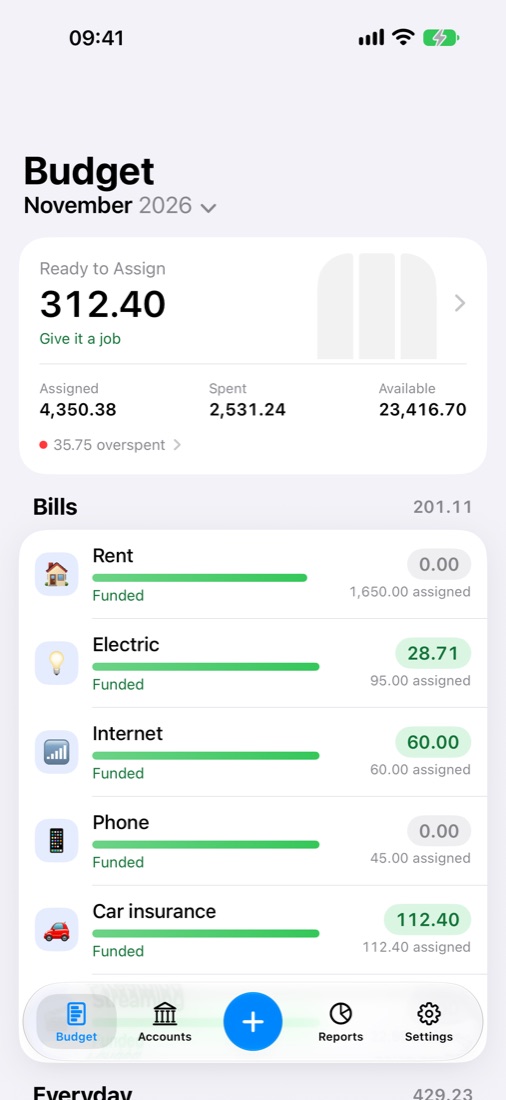
Made-up numbers, in any currency. Press Auto-Assign, then Undo.
Bridge Budget on your iPhone.
A native app, not a web page. It runs Bridge Budget's own engine on the phone and talks only to your own server.
- Opens in under a second, and always matches your server's version.
- Add a transaction in seconds, split it, and pick payees you use nearby.
- Widgets for Ready to Assign and upcoming bills, on your Home Screen.
- Face ID lock, Dark Mode, Dynamic Type and VoiceOver.
- Free with your Bridge Budget licence. No account with us, no tracking.


Switching takes a minute, not a weekend.
Self-hosting used to mean starting your budget from scratch. Bridge Budget brings it with you, targets included. Actual's own YNAB import leaves those behind.
Install it
One Docker command on a Raspberry Pi, a NAS or any small server. The setup guide walks you through it.
Paste your YNAB token
In YNAB, create a personal access token and paste it into Bridge Budget. It's used once, straight from your browser to YNAB, and never saved.
Pick up where you left off
Same method: Ready to Assign, targets, Auto-Assign. Your categories, history and plan are already there.
- Accounts and balances
- Every transaction, with payees and memos
- Categories, groups and their notes
- What you assigned, month by month
- Your targets, ready to useothers drop them
- Scheduled transactions, as Schedules
- Flags, as tags
What's different
- Bank connections. YNAB's linked accounts don't move. In Europe, Bridge Bank syncs 2,500+ banks automatically; anywhere else, import your bank's file (CSV, OFX, QIF).
- The app. A native iPhone app is coming to the App Store, free with your licence. Until then it runs in your phone's browser and can sit on your home screen.
- The server is yours. You run it, so your budget never sits on someone else's computer. That's the point.
What you save
YNAB charges US$109 a year, about €100. Bridge Budget is one payment in euros with updates included. Paying in another currency? Your card converts it.
Budgeting that tells you what to do next.
Built on the open-source engine behind Actual Budget, with the parts people miss from YNAB put back.
Targets you set with a few clicks
Weekly, monthly, yearly or by a date. Set aside a fixed amount or refill up to one. Give a target a date and it's a bill in Schedules, and the two stay in step. Your YNAB targets come across as they are. No template syntax to learn.
One click to fund it all
Fund every underfunded target, or cover every overspent category, from Ready to Assign or from another category.
Five reports, no dashboard to build
Spending, income against spending, net worth, age of money and target progress.


Also in the box
- Works on your phone: in your phone's browser today, and soon in a native iPhone app.
- Undo and Redo for every change, with buttons or the usual shortcuts.
- Privacy mode hides every amount in one click, for budgeting in a café or on a shared screen.
- Notes on schedules: why a bill exists, or who shares it.
- Bill reminders: a notification the day before a bill is due, and the app icon shows how many are late.
- It tells you when an update is out, and saves a copy of your budgets before installing it.
- Something wrong? One button downloads a log to email, with account numbers and passwords masked.
Bills that budget for themselves.
Give a category's target a date, and it's a bill in Schedules too. The category saves for it by the due date.
- Change it in the budget or in Schedules, and the other follows.
- Several bills can share one category, each with its own date.
- Money you're expecting lands in its category.
- A late payment shows as "Expected, not arrived", and links itself once it's in, from bank sync, a file or typed by hand.
What makes it different.
Leaving YNAB costs nothing
Self-hosted apps usually mean rebuilding your budget by hand. Here one token brings it all across, targets included.
Your data stays home
Most budgeting apps keep your finances on their servers. Bridge Budget runs on yours, and nothing about your budget is sent to us.
Pay once
No subscription. YNAB costs about €100 every year; Bridge Budget is a single payment with updates included.
Schedules wired into the budget
A target with a date is a bill in Schedules, several bills can share one category, and incoming money finds its category. We haven't seen another budgeting app do this.
No lock-in
Underneath it's a standard Actual budget. Switch back to Actual, or move anywhere else, and take all of it with you.
Support from the maker
Questions go straight to the person who built it, and fixes ship as soon as they're ready.
Bring your own assistant.
Bridge Budget has no AI built in, and it never calls an AI service. If you already use Claude or ChatGPT, you can connect it to your budget yourself with a private link from Settings. It can then categorize transactions, write rules, set targets and move money, on the plan you already pay for. No API key, nothing extra to pay.
It connects straight to your own server, works on your computer and your phone, and only sees what it looks up to answer you. Don't use an assistant? Nothing changes: the budget works fully without one.
update_transactions · create_ruleDone. 14 transactions moved to Groceries, and new imports from either shop will land there too.auto_assign · overspent · previewThat's 38,20 across Phone & internet and Gifts. Eating out has 21,30 left, so I can cover 21,30 now. Go ahead?Pay once. Keep it.
No subscription. Updates included. Try everything free for 30 days first.
Bridge Budget
Launch price
Charged in euros: €59. Dollars at today's rate.
- Targets, Auto-Assign and the five reports
- Connects to the Claude or ChatGPT app you already use
- One server, every device that uses it
With Bridge Bank
Launch price. Bought separately: €98
Charged in euros: €79. Dollars at today's rate.
- Everything in Bridge Budget
- Automatic sync from 2,500+ European banks
- Sync now, from the sidebar or your phone
- Two license keys in one email
From the maker of Bridge Bank and Klartion.
Bridge Bank and Klartion connect people's bank accounts to their own tools, Actual Budget and Notion, every day, for paying customers across Europe and North America. Bridge Budget is built the same careful way: your data stays with you, payments go through Stripe, and support comes straight from the person who wrote it.
Questions
How do I move from YNAB?
Is this Actual Budget?
Where does my data live?
Do I need Bridge Bank?
Does Bridge Budget use AI?
What happens when the trial ends?
How do updates work?
What can it run on?
Does it work outside Europe?
Something else? Email support@david-alves.com.